
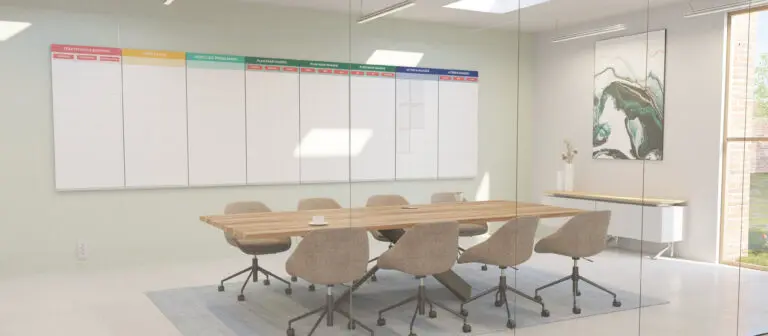
Digital visual management tooling comparison for your “virtual” Obeya
Digital Obeya — Leading with Obeya
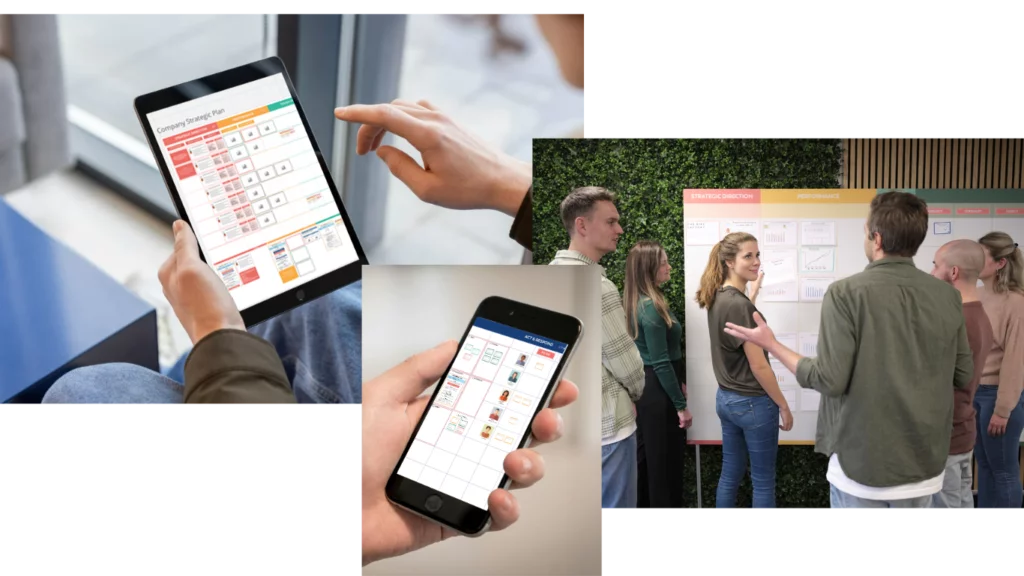
Why is virtual Obeya relevant for you?
In a world buzzing with constant emails, messages, and meetings, it can feel like a whirlwind of chaos. That's where the concept of a digital Obeya steps in, acting as a beacon of structure in the stormy seas of workplace collaboration.
It's not just about using digital tools. It's about shaping a space where teams can pinpoint problems, brainstorm solutions together, and make decisions based on realtime information.
Using Obeya will save time and energy for everyone by spending significantly less on meetings and emails. This process is crucial for businesses that want to succeed because it aligns everyone's efforts towards executing the company's strategy effectively.
Because the Obeya revolves around the team, its effects are usually strongest when the team can actually walk into the room and do the work. But this is not always possible or desirable.
There are three good reasons why you may be looking for a digital Obeya rather than setting up a physical big room:
No physical room
There is no physical room available.
Distributed teams
The team does not work on the same location or maybe not even in the same time zone.
Digital preference
There is a preference for digital with the potential to integrate other digital systems like dashboards into the Obeya.
To make things more interesting, some teams choose to work in a hybrid form. Enjoy the benefits of both a physical Obeya when working together on site, as well as the virtual Obeya when the team is working remotely or outside of office hours.
However you want to approach it, you'll need to select a digital visual management tool for your visual management needs. Tools that will do this for you are subject of this comparison.
Since these tools start off with exactly that, a white board with nothing on it, you'll need templates to build an actual Obeya on that white space. For this you can check out our Leading with Obeya (LWO) Virtual Obeya Templates. These templates are great because they look and function exactly the same albeit on a physical or virtual Obeya.
What we did in this comparison is to test the Leading with Obeya templates on the various tooling and share with you the experiences that we had.
Selecting the right tool for your virtual Obeya
We've identified 9 categories which we believe are essential for your visual management tool when setting up a virtual Obeya. We've analyzed top contenders like Microsoft Whiteboard, Miro, Mural, iObeya, Conceptboard, and FigJam and reported our experience on each of them for the 9 categories.
We find that each tool brings something valuable to the table and we would like to inform readers about these unique features. The goal of the research is to support readers to make an informed decision, about which Digital Obeya tooling fits their purpose, context, and needs.
Core Features
What core features are present for online whiteboarding and visual collaboration?
User interface & Experience
What does the user see and experience during the interaction of the tool?
Facilitation
What facilitation features are present in the tools that supports the conversation and collaboration?
Content integration & interaction
How easily can the user add, edit, and interact with the content?
Security & Data management
How Secure and Compliant is the tooling? What flexibility in (data) hosting is available?
Content Management
How to organize and use content in your Obeya, so that (new) users easily understand the context?
Artificial Intelligent support
What A.I. features are available that make your life easier?
User & Access management
What options are available to add and invite users?
Conference & Meeting Integration
What integrated communication features are present? What integrations for the major conferencing software is available?
The winners per category
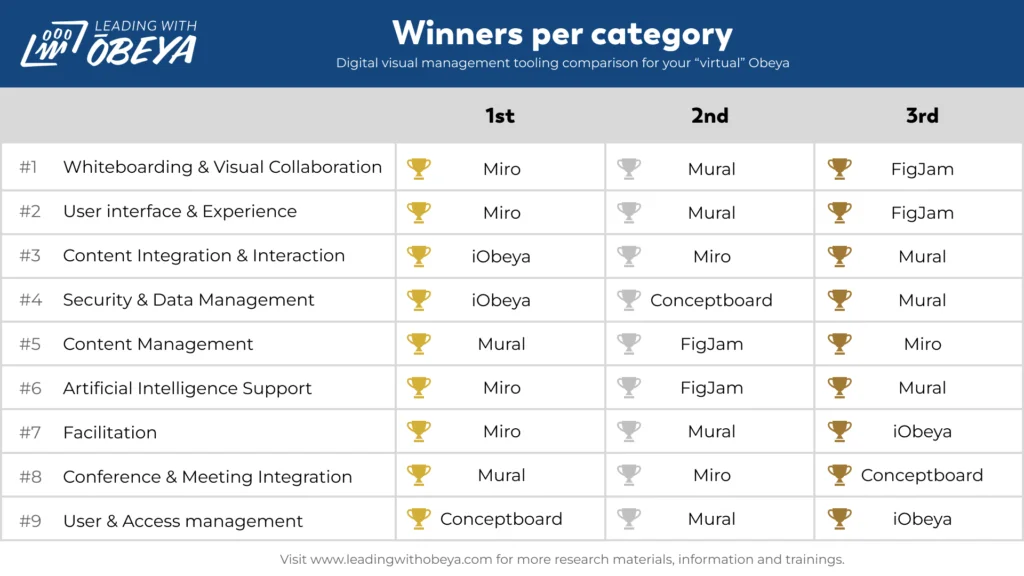
In the below table you'll find the categories on which we've scored the tools and their outcomes. It shows that each tool has their own strengths & weaknesses, even more important for you to figure out what is important to you in an online whiteboard tool.
| Category | 🥇 First | 🥈 Second | 🥉 Third |
|---|---|---|---|
| Online whiteboarding & visual collaboration | Miro | Mural | FigJam |
| User interface & experience | Miro | Mural | FigJam |
| Content integration & interaction | iObeya | Miro | Mural |
| Security & data management | iObeya | Conceptboard | Mural |
| Content management | Mural | FigJam | Miro |
| AI support | Miro | FigJam | Mural |
| Facilitation | Mural | Miro | iObeya |
| Conference & meeting integration | Mural | FigJam | Miro |
| User & access management | Miro | Mural | FigJam |
Conclusions explained
Let's run through the conclusions for each category, explaining a bit more as to how these tools ended up in their spot.
Online Whiteboarding & Visual Collaboration
Miro takes the lead, offering an expansive whiteboarding experience. Mural places second with its dynamic toolset, while FigJam clinches third, promoting interactive brainstorming sessions.
User Interface & Experience
Miro tops the charts with a clean, user friendly interface. Mural follows with its intuitive design, and FigJam ranks third, making digital collaboration accessible and engaging.
Content Integration & Interaction
iObeya excels in this arena, particularly with its capability to integrate Power BI dashboards and update graphs in realtime from SharePoint data, allowing for informed decisions based on the latest info. Miro and Mural also perform strongly with their strong content integration features.
Security & Data Management
With excellent data management options, iObeya and Conceptboard lead the way, especially for those who require on premises hosting. Conceptboard also stands out for its dedicated EU focused hosting solutions and compliancy. Mural coming in as a solid third option.
Content Management
In keeping content well organized, Mural offers a unique building block library. FigJam integration with Figma is unique as well, but experience with Figma is required. Miro offers also structured content management, securing the third spot.
Artificial Intelligence Support
Miro is at the frontrunner with its advanced AI support, FigJam follows with creative AI tools, and Mural captures the third position.
Facilitation
Mural and Miro are distinguished for their facilitation superpowers, enhancing teamwork and collaboration with features like hiding and revealing content during sessions and reacting to elements. iObeya completing the top three.
Conference & Meeting Integration
When it comes to seamless integration with conferencing tools, Mural and FigJam take the top spots, with Miro rounding out the podium.
User & Access Management
Miro, Mural, and FigJam make it exceptionally easy for team members to join and collaborate within the digital Obeya space.
Key factors to help select the right visual management tool
Next to functionality, there are some important aspects for you to consider in your selection process. For example, company policy restrictions or available budget may be something to consider when selecting the right tool for you.
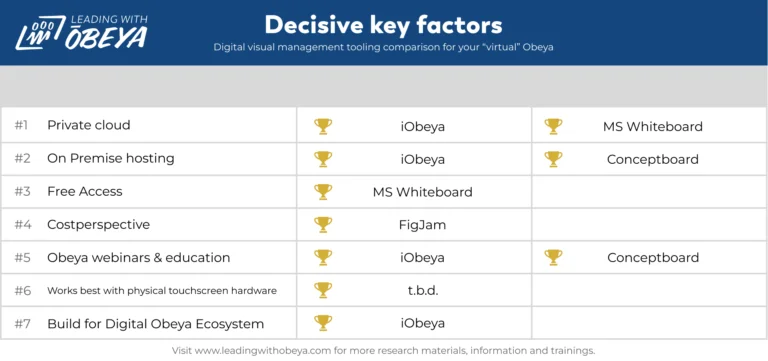
Private Cloud Options
Some organizations have policies that restrict public cloud use. In that case it is useful to look at private cloud options. iObeya and MS Whiteboard receive praise for offering private cloud options, strengthening data privacy and confidentiality.
On Premises Hosting
Some organizations have the need to use their own servers. iObeya and Conceptboard provide the valuable option of on premises hosting, catering to businesses with stringent compliancy & security requirements.
Free Access
Interested in using Online Whiteboarding and some parts of a Virtual Obeya and want to learn to work with it without paying? Microsoft Whiteboard is noteworthy for being available at no extra cost with Office 365 subscriptions.
Cost Perspective
Adding an extra tool will bring additional costs. For teams and organization that want to start but are limited in options from a cost's perspective. We found the following option: For teams already using Figma, FigJam emerges as a cost effective solution, thanks to its seamless integration with the design platform.
Obeya Webinars
A tool is only as good as the team using it. If learning & developing in the use of a Virtual Obeya is important for you, we can recommend the following two: iObeya and Conceptboard distinguish themselves by offering webinars that serve as a resource for expanding knowledge on Obeya and its digital tooling.
Integration with Physical Touchscreen Hardware
This research topic is waiting for future exploration. Please contact us if you're interested!
Enterprise Visual Management System
iObeya is singled out for its unique ability in live syncing information across all digital Obeyas, a key attribute for enterprise level management systems.
5 Ways to help you get started with your Virtual Obeya
We invite businesses to dive into our comprehensive research and optimize their online collaboration tool for improving their strategy execution. By embracing a digital Obeya, organizations will improve on problem discovery, collaborative problem solving, informed decision making, and continuous improvement, all of which are vital to become champions in today's fast paced business world. Below are 5 ways that help you to get you started with your Digital Obeya.
- 1
Start with what you have. You're probably already using digital visual management! So why not start using them during the next meeting. Think about strategy documents, quality reports or using a Kanban ("visual board" of "card"). Put them on the screen during the next meeting and learn how it impacts your conversation during the meeting.
- 2
Support the conversation with visualizations. End your meeting with a reflection question: what information can we visualize next time, to come faster to a decision or action?
- 3
Best practices within the company. If you work in a bigger enterprise and you want to start with a Digital Obeya. Investigate if any visual management tooling is already being used by other departments. If this is the case this is a nice opportunity to learn from each other.
- 4
Obeya Go and See. The best way to learn about Obeya is go and see a real Digital Obeya. Get in contact with other companies that already are using a Digital Obeya. They're highly likely enthusiastic to inspire and inform you about their Obeya journey and lessons learned. Contact us if you want to use companies our LWO network!
- 5
Visit tooling demonstration. If you're in need of visual management tooling request a demo from the vendor and/or visit their (free) webinars, to see and learn how the product works and is being used for Digital Obeya purposes.
More documents
Want to learn how to solve your management problems with virtual Obeya?
Join us at Leading with Obeya to redefine your strategy execution. With a virtual Obeya, your team can synchronize efforts, drive transparency, and innovate together for collective success.
For guidance on how digital visual management tooling and setting up a Virtual Obeya can streamline your workflow and sharpen your business focus, reach out to our experts digitalobeya@leadingwithobeya.com
About the author
Bertus Groenewegen is Product Owner Digital Obeya for Leading with Obeya. With his background in IT and passion for continuous improvement, he wants empower people to make an informed decision about which Virtal Obeya tool fits their purpose and organization context, to achieve strategy execution together!
Disclaimer & credits
Disclaimer:
- Leading with Obeya is an independent organization and this article is created without sponsoring.
- Leading with Obeya has no preference for tooling.
- The Full Research PDF slidedeck will serve as detailed overview to inform the reader and it will also serve as evidence. (if screenshots can be made).
- For features where no screenshots can be made, url's will be provided to the product/supplier.
- If any incorrect information is shown, that's completely unintentional. The speed of development of tooling is going fast and it even outpaced this research a few times.
Credits:
- Previous article LWO Virtual Obeya – tooling comparison (2020)
- Microsoft Whiteboard — https://www.microsoft.com/nl-nl/microsoft-365/microsoft-whiteboard/digital-whiteboard-app
- Miro — https://miro.com/ – Thanks Nicole Kurek and the Miro Marketing Team.
- Mural — https://www.mural.co/ – Thanks Wout Hermans!
- Conceptboard — https://conceptboard.com/ – Thanks Felicitas Hilge!
- iObeya — https://www.iobeya.com/ – Thanks Olav Maassen!
- FigJam — https://www.figma.com/figjam/
Want to learn how to solve your management problems with virtual Obeya?
For guidance on how digital visual management tooling and setting up a Virtual Obeya can streamline your workflow and sharpen your business focus, reach out to our experts.
Get in touch